

· onsim · 2 min read
Show your landline number when calling from your mobile
Make calls from your mobile while displaying your 020/01/02 landline number to the person you are calling
Make calls from your mobile while displaying your business landline number - no apps, no workarounds.
Yes — you can show your landline number when calling from your mobile. With ONSIM, your outbound caller ID is your landline number, so customers see your business UK landline number instead of a personal mobile.
What the person you call sees
When you make a call, the recipient sees your landline number (e.g. 020, 01 or 02), just like a traditional office phone — even though you’re calling from a mobile.
Note: You can also display an 07 mobile number if you prefer (you can display any number you own) and you can display your landline or mobile across multiple mobiles which is helpful if you have a team answering calls.
How it works
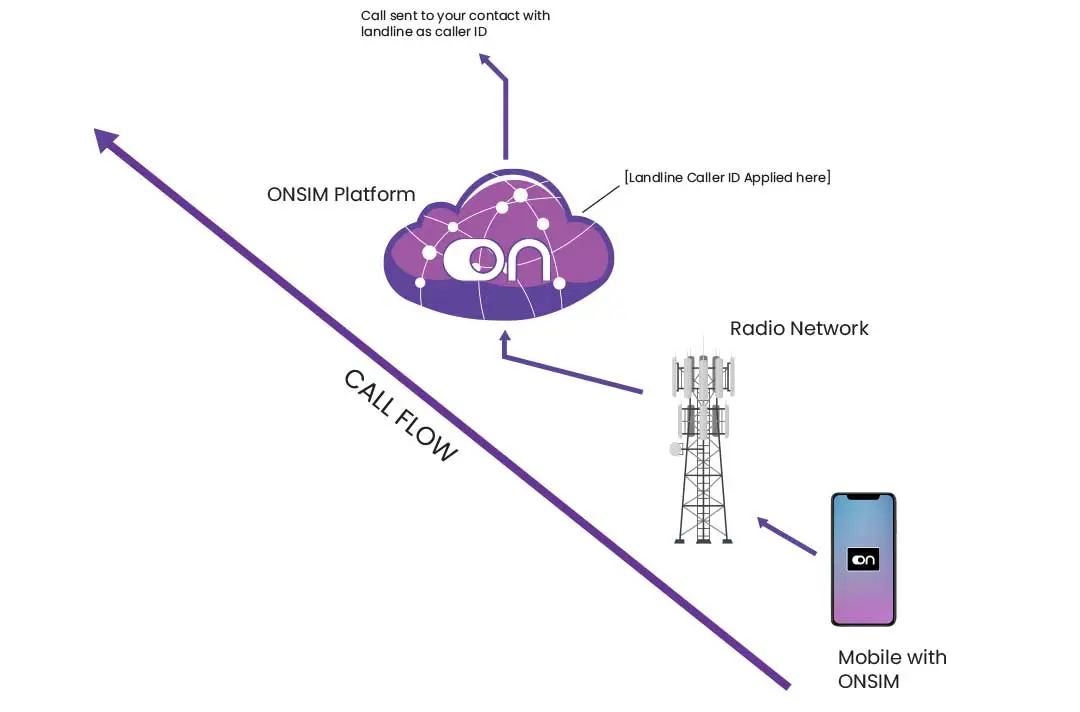
ONSIM works by assigning your landline number directly to your SIM, so when you make a normal mobile call it’s routed through our network which presents your landline number as the caller ID. No apps or call forwarding required.
How to get started
1. Signup for an account
Signup for an account by clicking here. You can choose a new number or transfer in an existing number.
2. Install your SIM/eSIM
Install your ONSIM SIM in/on your device.
3. Make calls as normal
Your landline number is shown automatically as your caller ID to everyone you call.
Why this matters
Look professional
Present a trusted business number instead of a mobile.
Protect your privacy
Keep your personal number hidden.
Increase answer rates
Customers are more likely to answer landline calls.
No apps required
Works natively without VoIP Apps
Want your landline number to ring on your mobile too? 👉 Receive calls on your mobile
FAQs
Frequently Asked Questions
Most common questions about making calls displaying a landline using ONSIM
What number is displayed when I make a call?
The person you call will see your UK landline number (01/02/03), not a mobile (07) number.
Do I need to dial differently to show my landline number?
No — you call as normal using your phone’s dialler. Your landline number is applied automatically.
Do I need an app?
No — calls are made natively through the mobile network using your phone’s built-in dialler and contacts.
Does this work without internet or WiFi?
Yes — calls are made over the mobile network, so no internet connection is required.
Will my landline number display correctly every time?
Yes — your landline number is presented at network level, ensuring consistent and reliable caller ID.
Can I use my existing landline number?
Yes — you can port your number to ONSIM.
Will this work on iPhone and Android?
Yes — it works on supported iPhone, Samsung and Google Pixel devices.
How is this different from VoIP or calling apps?
ONSIM works directly through the mobile network rather than apps or internet-based calling, providing more reliable call quality and consistent caller ID.
- caller id
- landline sim